


info@kps.com.vn
+84 903 709 019
In today's surveillance camera world, resolution is the key factor that determines the quality of recorded images. However, among a series of options from 2MP, 5MP to 4K, not everyone knows which level is suitable for their actual needs. Should we "upgrade" to 4K for sharpness, or is 2MP enough? The article below will help you understand clearly The differences between common resolution levels, and how to choose the best one based on your intended use, installation location, and investment budget.
Resolution is an index that represents the number of pixels in a frame or video. The more pixels, the sharper and more detailed the image. In the field of cameras and screen, resolution is usually measured in megapixels (MP) or horizontal x vertical resolution notation (for example: 1920x1080).
The total number of pixels in a frame will be calculated by multiplying these two numbers. The unit commonly used to measure camera resolution is Megapixel (MP), in which 1 MP = 1 million pixels. The higher the resolution, the more pixels, the sharper, more detailed and more detailed the image better zoom capability without image distortion.
In the security camera market, you will often encounter the following resolution levels:
1. 2MP (Full HD / 1080p)
Technical specifications: 1920 x 1080 pixels, equivalent to about 2 million pixels.
Advantages:
Price affordable: This is the most basic and popular resolution level, with low investment costs.
Clear enough for basic needs: Provides clear images enough for overall monitoring, identifying large objects at close range.
Save storage space and bandwidth: Suitable for network systems and recorders with moderate capacity.
Disadvantages:
Image details are significantly reduced when zoomed in.
Difficult to recognize small details such as license plates, faces clearly at a distance.
Suitable applications: Monitoring houses, apartments, small shops, offices that do not require too much detail high.
2. 5MP
Specifications: Usually 2560 x 1920 pixels (or 2592 x 1944), which is approximately 5 million pixels.
Advantages:
Significant improvement in detail: Images are much sharper than 2MP, allowing for better recognition of fine details when zoomed in.
Wider coverage: Can cover a larger area while maintaining clarity sharp.
Disadvantages:
The price is higher than 2MP.
Requires larger storage capacity and network bandwidth.
Suitable applications: Large houses, offices, medium-sized shops, factories, areas that require better details for object recognition.
3. 4K (8MP / Ultra HD - UHD)
Specifications: 3840 x 2160 pixels, equivalent to about 8 million pixels. This is 4 times higher resolution than Full HD (2MP).
Advantages:
Super sharp details: Provides extremely clear images clear, allowing for excellent digital zooming to recognize the smallest details such as writing, license plates at a distance, or faces clearly in a crowd.
Covering a very wide area: A single 4K camera can replace multiple lower resolution cameras in large areas.
Disadvantages:
Highest cost: Cost Investing in a 4K camera system (camera, recorder, hard drive, display) will be significantly higher.
Requires large storage capacity: 4K video takes up a lot of hard drive space.
Requires high bandwidth: A strong and stable network connection is required to view live or remote video smoothly.
Requires a compatible display to maximize 4K quality.
Suitable application Applications: Large public areas (airports, shopping malls, plazas), banks, large warehouses, parking lots, or anywhere that requires the highest level of detail and readability.
Pixel Density (PPI - Pixels Per Inch): Actual sharpness also depends on the size of the screen. A 55-inch 4K monitor will have a lower pixel density (less sharp up close) than a 27-inch 4K monitor. The higher the PPI, the smoother the image.
Screen Resolution vs Photo/Video Resolution: Screen resolution (e.g. 1920x1080) is the physical number of pixels on the screen. Photo/video resolution (e.g. 4000x3000) is the number of pixels in the content file. Viewing photos/videos with a higher resolution on the screen will be downscaled, lower resolution will be upscaled, which can reduce quality.
Camera (Camera, Phone): Resolution is usually measured inMegapixels (MP), which is the total number of millions of pixels. For example, 12MP is equivalent to about 4000x3000 pixels. However, higher MP does not always mean better image quality (it also depends on sensor size, lens quality, image processing).
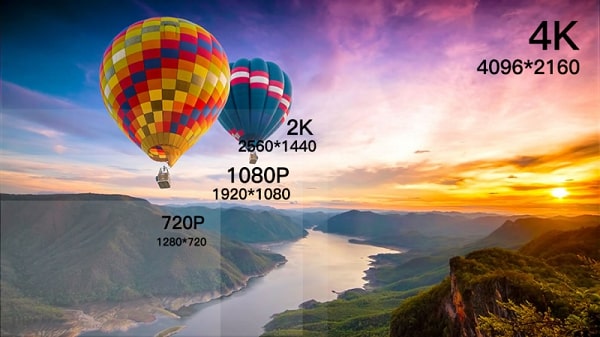
When choosing a suitable resolution In order to choose the right monitor, you need to carefully consider the following factors to ensure the optimal balance between quality, experience and cost:
Small screens (under 32 inches, phones): Full HD (1080p) or QHD (1440p) resolution is usually sharp enough. 4K on a screen that's too small may not make a noticeable difference to the naked eye.
Medium-sized screens (32-55 inches):Full HD is still acceptable, but4K/UHD offers a clear advantage in detail, especially when sitting close.
Large screens (over 55 inches): 4K/UHD is almost mandatory to ensure the image is not grainy or blurry when viewed close up. 8K has can take advantage of very large screens (75 inches or more).
Viewing distance: The closer you sit, the higher the resolution needs to be so that your eyes don't see individual pixels (blurring). Sitting further away, the difference between Full HD and 4K is reduced.
Watching movies/TV, multimedia entertainment: Priority 4K/UHD if there is supported content (Netflix, Disney+, Blu-ray 4K) and the screen is large enough. Full HD still popular and good enough for many needs.
Office work, web surfing: QHD (1440p) or 4K (UHD) on a 27-inch or larger monitor provides a larger workspace, allowing for more windows and sharper text. Full HD is still usable but space is limited.
Gaming:
Competitive gaming (eSports): Usually prioritize high refresh rates (144Hz, 240Hz+) over ultra-high resolutions. Full HD (1080p) or QHD (1440p) are popular choice for high FPS.
AAA games with beautiful graphics, open world: QHD (1440p) or 4K (UHD) deliver vivid, detailed visual experiences. Note: 4K games require very powerful graphics cards (RTX 3080 or higher, RX 6800 XT or higher).
Professional graphic design, photo/video editing Professional: 4K/UHD (or higher) is ideal for large workspaces and high color accuracy and detail. Monitor should support wide color gamut (Adobe RGB, DCI-P3).
Surveillance camera: Consider Full HD (1080p) or 4K (UHD) depending on the detail needed, combined with the shooting angle, lighting conditions and storage capacity.
Graphics Card (GPU): Playing games or rendering videos at high resolutions (especially 4K) requires an extremely powerfulGPU. Check to see if your graphics card is powerful enough to run smoothly at your desired resolution. Weak GPUs running 4K games will experience serious lag.
Port: Make sure the port (HDMI, DisplayPort) supports enough bandwidth for high resolution and refresh rate. For example e.g. HDMI 2.0 is good for 4K@60Hz, HDMI 2.1 for 4K@120Hz/8K@60Hz.
Game consoles: PS5/Xbox Series X support 4K@120Hz gaming (requires TV/monitor with HDMI 2.1), Series S usually targets 1440p.
CPU & RAM: Processing 4K/8K video or playing intense games also requires a powerful CPU and enough RAM.
Is high-definition content available? Owning a 4K/8K monitor but only watching SD TV channels or 1080p YouTube videos is a waste. The quality of the source content is deciding factor.
Streaming Services: Netflix, Disney+, Amazon Prime... have a lot of 4K content (usually requires a premium package and stable internet bandwidth >25Mbps for 4K). 8K content is still very rare.
Blu-ray players, game consoles: These devices have 4K output capability.
Cost Hardware upgrade (PC): Running 4K smoothly requires a large investment in GPU, CPU, PSU.
Content cost: 4K streaming packages are often more expensive, 4K Blu-ray discs are more expensive than regular DVD/Blu-ray discs.
Storage cost: 4K/8K videos take up a huge amount of storage (camera, edited video files).
Cost Internet bandwidth: 4K streaming requires a high-speed, unlimited internet plan ata (if available).
This metric combinesresolution andscreen size, and indicates how "smooth" the image is. The higher the PPI, the sharper the image appears when viewed up close.
Comparing PPI is more important than comparing pure resolutionwhen choosing between monitors of different sizes. A 24-inch Full HD (1080p) monitor has a PPI of ~92, while a 32-inch 4K (UHD) monitor has a PPI of ~92. PPI ~138, the image will be much smoother.
Specifications: 640 × 480 px (4:3) or 720 × 576 px (PAL).
Advantages:
Very low price, suitable limited budget.
Saves power and storage capacity.
Enough for basic TV content, surveillance cameras.
Disadvantages:
Blurred, grainy images on the screen > 20 inches.
Does not support modern content (Netflix, YouTube HD).
Applications: Cheap TVs, old devices, basic security cameras.
Specifications: 1280 × 720 px (16:9).
Advantages:
Balance between price and quality, popular on mid-range laptops/phones.
Stable display on screens < 32 inches.
Disadvantages:
Limited detail, not suitable for watching movies or graphic design.
Easy to show pixels when sitting close.
Application: Advertising screens, bedroom TVs, mobile devices.
Specifications: 1920 × 1080 px (16:9).
Advantages:
Sharp images, affordable price reasonable.
Widely supported content (YouTube, Netflix, PC games).
Saves hardware resources compared to 4K/8K 5.
Disadvantages:
Lack of detail on the screen > 55 inches.
Does not take advantage of advanced HDR technology.
Application: Home TV, computer monitor, mid-range gaming.
Specifications: 2560 × 1440 px (16:9).
Advantages:
Superior Full HD sharpness,Ideal for 27-32 inch monitors.
Balance between performance and quality when gaming.
Cons:
Price higher than Full HD, &less native streaming content supported.
Requires mid-range graphics card (RTX 3060 or better).
Applications: Gaming, graphic design, photo editing.
Specifications: 3840 × 2160 px (16:9).
Advantages:
4 times the resolution of Full HD, displaying maximum details on a > 55-inch screen.
Supports HDR, vivid colors, optimized for home cinema.
Rich content (Netflix 4K, Blu-ray, PS5/Xbox Series X).
Disadvantages:
High TV/monitor price, requires powerful GPU (RTX 3070 or better).
Consumes streaming bandwidth (>25 Mbps) and storage capacity.
Applications: High-end TV, film production, professional design, AAA gaming.
Specifications: 7680 × 4320 px (16:9).
Advantages:
"Ultra-realistic" detail, 4 times that of 4K, ideal for displays > 75 inches.
Smart upscale technology, upgrade low-resolution content.
Futurize the entertainment system.
Disadvantages:
Price very high (2–3 times that of 4K TVs of the same size).
Lack of native 8K content, requires extremely powerful hardware (RTX 4090, HDMI 2.1).
Applications: High-end screening rooms, medical research, Hollywood film production.
| Resolution | Main Advantages | Main Disadvantages | Best for |
|---|---|---|---|
| SD | Cheap, energy efficient | Low quality, doesn't support large screens | Old devices, security cameras |
| HD | Price/quality balance | Limited details | Screen < 32 inch, office |
| Full HD | Popular, price good | Limited to large screens | Home TV, basic gaming |
| 2K/QHD | Outstanding clarity, balanced performance | Less content supported | Gaming, graphics |
| 4K/UHD | High detail, vivid HDR | Expensive, requires powerful hardware | Movies, professional design industry |
| 8K | "Hyperreal" sharpness, futuristic | Very high price, little content | Screening room, medical, production |
This is the most common misconception. Although Higher resolution certainly provides more pixels and better detail, but overall image quality doesn't depend solely on resolution. Other factors include:
Image sensor quality: A poor quality sensor, even one with a high resolution, will produce images that are noisy, blurry, or lack color fidelity, especially in low-light conditions. low light.
Lens: Poor quality lenses can cause image distortion, reduced sharpness at corners, or not capture enough light.
Image processing capability of the chip: Processing technologies such as WDR (Wide Dynamic Range), BLC (Backlight Compensation), 3D DNR noise reduction... play a role important in improving image quality in different lighting conditions.
Real-life lighting conditions: Even 4K cameras have difficulty producing beautiful and clear images if the environment is too dark, with strong backlighting and without supporting technologies.
For example: A 2MP camera from a reputable brand, using a good sensor and high-quality lens, which can produce better and clearer images than a cheap 5MP camera, which does not have a clear origin in low light conditions.
Many people think that buying a 4K camera is the best and solves all problems. However, choosing a resolution that is too high for your actual needs can lead to:
High cost: 4K cameras and The accompanying system (recorder, hard drive) is significantly more expensive. If your needs are only basic surveillance, 2MP is enough.
Using a huge amount of storage space: 4K video takes up a lot of space. If you don't prepare enough hard drives, the storage time will be very short, or you have to constantly delete old data.
Requires a huge amount of network bandwidth: Watching live or playback 4K video remotely requires an extremely strong and stable internet connection. If the network is weak, you will experience lag, stuttering or no viewing, which reduces the effectiveness of monitoring.
Compatible display device required: To truly see 4K quality, your viewing screen must also support 4K. If you watch on a Full HD screen, you will not feel the full sharpness.
Advice: Carefully consider your needs, budget and your network infrastructure capabilities before deciding on the highest resolution.
Phone screens, especially small models, often have a high pixel density (PPI), which makes the image appear sharp even if the actual resolution of the camera isn't very high. Furthermore, phone camera viewing apps often compress the data stream to fit suitable for mobile network bandwidth.
Problem: When you need to enlarge a small detail on a large screen (such as a computer, TV), or when extracting a video for evidence, you realize that the original sharpness on the phone is only relative. The image may be broken, difficult to identify.
Advice: Evaluate the image quality based on the end use and main display device, not just through the phone screen.
Resolution is just one factor. Environmental conditions such as:
Completely low light/too dark: The camera needs to have infrared (IR) or Starlight technology to see clearly at night. High resolution doesn't help much without light.
Strong backlight: Light from behind the subject can make the subject appear dark. The camera needs WDR to balance the light and make both the bright and dark areas clearer. dark areas.
Rain, fog, dust: These weather or environmental factors can significantly reduce sharpness of the image, no matter how high the resolution.
Installation location, viewing angle: Too narrow, too wide or obstructed angles also affect the monitoring effectiveness.
Advice: Always consider the resolution in combination with other camera features and installation environment conditions.
As mentioned in misconception number 1, the quality of sensors, lenses, and image processing chips between different brands and models is very different. Two cameras with the same 5MP but from two different brands (or the same brand but different product lines) can produce image quality that is "worlds apart".
For example: A 5MP camera from a major brand, has A reputable brand (eg Hikvision, Dahua) will have sharp images, true colors and much better light handling than a cheap "floating" 5MP camera on the market.
Other news

Signify and KPS sign strategic partnership agreement.
Signify and KPS have signed a strategic partnership to promote smart, energy-efficient lighting solutions for buildings in Vietnam.
View detail

From APEC 2017 Da Nang to APEC 2027 Phu Quoc: From traditional security solutions to smart IOCs.
From APEC 2017 security monitoring solutions to a smart IOC model for APEC 2027 in Phu Quoc.
View detail

Team Building KPS 2026 | Da Nang - Hoi An - Hue
KPS 2026 Team Building journey in Da Nang - Hoi An - Hue, where teams bond, recharge, and spread sustainable values.
View detail

Optimizing air conditioning based on room conditions in hotels and resorts.
Why do 20-30% of hotel rooms still have their air conditioning running even when there are no guests?
View detail

Energy-saving solutions for hotels and resorts - without compromising the experience.
Consulting and implementing EMS systems for hotels - reducing electricity costs, smarter operation - without compromising customer experience.
View detail

Energy Management System (EMS): Cost and Operation Optimization
EMS solutions help businesses monitor, analyze, and optimize energy in real time, saving 10-30% on electricity costs.
View detail
ABOUT KPS


Regulations and policies
Warranty and return policy Delivery, payment, and feedback Giấy phép kinh doanhContact Information
HO CHI MINH OFFICE
10–12 Dong Van Cong Street, Cat Lai Ward, Ho Chi Minh City.
+842839976099 / 903 709 019
info@kps.com.vn
www.kps.com.vn
Work time
Monday – Friday : 8:00 AM - 17:30 PM
Saturday - Sunday: Off
HA NOI OFFICE
22 Alley 168 Nguyen Xien, Khuong Dinh Ward, Hanoi City
+84 903 709 019
kpshn@kps.com.vn
www.kps.com.vn
Work time
Monday – Friday: 8:00 AM - 17:30 PM
Saturday - Sunday: Off
DA NANG OFFICE
490 Nguyen Tri Phuong, Hoa Cuong Ward, Da Nang City
+84 903 709 019
kpsdn@kps.com.vn
www.kps.com.vn
Work time
Monday – Friday: 8:00 AM - 17:30 PM
Saturday - Sunday: Off
CAN THO OFFICE
11/11 Tran Binh Trong, Ninh Kieu Ward, Ninh Kieu District, Can Tho City.
+84 090 709 019
kpsct@kps.com.vn
www.kps.com.vn
Work time
Monday – Friday: 8:00 AM - 17:30 PM
Saturday - Sunday: Off
SERVICE CENTER - WAREHOUSE
10–12 Dong Van Cong Street, Cat Lai Ward, Ho Chi Minh City.
+ 84 28 3997 0609
baohanh@kps.com.vn
www.kps.com.vn
Work time
Monday – Friday: 8:00 AM - 17:30 PM
Saturday - Sunday: Off
2010 © Bản quyền thuộc KPS
Online: 37 | Visitors Counter: 17748026
About | Recruitment | News | Contact Us


